
| Overview | Release Notes | Support | Documents | References | Porting to BB | To Do | Statistics | SDR Receiver |
| RTKLIB: An Open Source Program Package for GNSS Positioning |
|
|
Download
Si solo necesitas extraer los datos y no te importa perder el formato (colores, fuentes, bordes), este es el método más veloz. Abre el archivo protegido.
El sistema procesará una contraseña alternativa y verás el mensaje de éxito. Tu hoja estará lista para editar. Resumen: ¿Qué método elegir?
Asegúrate de utilizar sitios web reputados para evitar la descarga de archivos ejecutables maliciosos camuflados como hojas de cálculo. Métodos alternativos (Seguros y sin conexión)
Una alternativa en la nube segura que permite arrastrar el archivo de Excel y descargar la versión desbloqueada en pocos segundos de forma gratuita. Paso a paso: Cómo usar un desbloqueador de Excel online
: Haz clic derecho sobre el archivo y selecciona Abrir con > Hojas de cálculo de Google . desproteger hoja excel online sin contrasena
Olvidar la contraseña de una hoja protegida en Excel es un problema común, pero afortunadamente existen técnicas efectivas para recuperar el acceso a la edición de datos sin necesidad de software de pago. Es importante distinguir entre la contraseña para un archivo (cifrado fuerte) y la protección de hojas individuales , la cual es mucho más sencilla de eludir. 1. Método del archivo ZIP (Estructura XML)
Selecciona la opción "Reemplazar hoja de cálculo" o "Crear nueva hoja de cálculo".
Haz clic derecho sobre el archivo subido y selecciona .
Si tu Excel contiene datos financieros, nombres, contraseñas o información de clientes, subirlo a una web desconocida es un peligro para la seguridad. Si solo necesitas extraer los datos y no
Si estás trabajando en un navegador web y prefieres no usar Google Sheets, puedes modificar las "entrañas" del archivo simulando un entorno online. Las hojas de Excel modernas ( .xlsx ) son en realidad carpetas comprimidas.
One day, Mariana got sick. The community needed to pay urgent suppliers, but no one knew the password. Her backup file? Also protected. They were stuck.
Selecciona toda esa etiqueta (desde el menor que < hasta el mayor que /> ) y elimínala.
Existen herramientas web diseñadas exclusivamente para eliminar contraseñas de hojas de cálculo. Son útiles si buscas una solución de un solo clic, aunque se recomienda precaución si el archivo contiene datos financieros o información privada. Tu hoja estará lista para editar
Una vez abierto en Google Sheets, verás que las restricciones de edición habrán desaparecido. Ve a .
Al igual que Aspose, GroupDocs permite desbloquear archivos desde cualquier dispositivo, incluidos smartphones, sin necesidad de instalar nada.
Verás archivos como sheet1.xml . Copia este archivo al escritorio.
# Ejemplo de uso: url = "https://example.sharepoint.com/sites/example/Shared%20Documents/Example.xlsx" username = "juan.perez@example.com" password = "mi_contraseña" desproteger_hoja_excel_online(url, username, password)
Este es el método manual más confiable para archivos con extensión .xlsx . Consiste en editar el código interno del documento para eliminar la etiqueta de seguridad.
Existen varias herramientas en línea y de terceros que pueden ayudar a desproteger una hoja de Excel sin contraseña. Algunas de estas herramientas son:
These are just old archives for recording. To download of the newest version, please visit the following GitHub links.
| Version | Date | Binary APs for Windows | Source Programs and Data |
| 2.4.2 p13 | 2018/01/29 | GitHub | GitHub |
| 2.4.3 b34 | 2020/12/29 | GitHub | GitHub |
The 2.4.2 pXX is the stable version with
the newest patches. The 2.4.3 bXX is the
development or beta version with experimental
implementations.
Please refer the support information for bug and known problem list.
GNSS-SDRLIB: Open Source GNSS Software Defined Radio Library (SDR working with RTKLIB)
Google play: RTKGPS+ (Android frontend of RTKLIB)
Overview
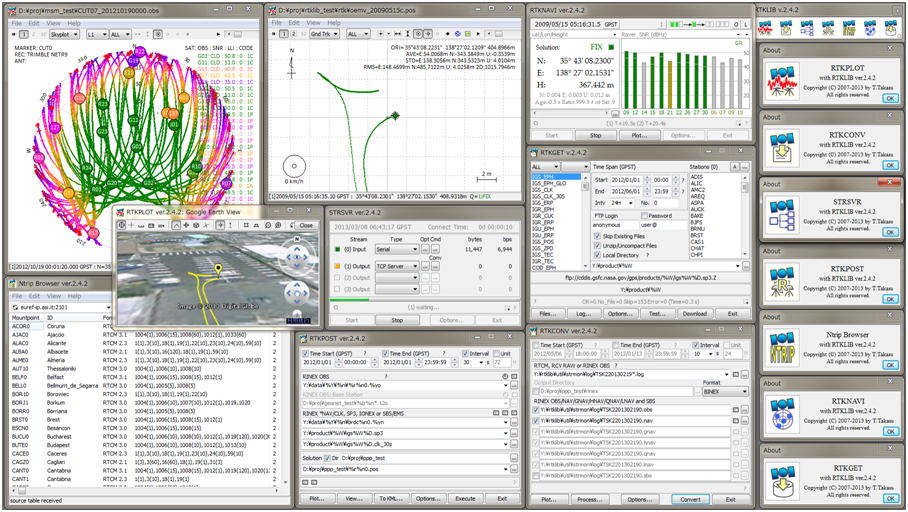
RTKLIB is an open source program package for standard and precise positioning with GNSS (global navigation satellite system). RTKLIB consists of a portable program library and several APs (application programs) utilizing the library. The features of RTKLIB are:
(1) It supports standard and precise positioning algorithms with:
GPS, GLONASS, Galileo, QZSS, BeiDou and SBAS
(2) It supports various positioning modes with GNSS for both real-time and post-processing:
Single, DGPS/DGNSS, Kinematic, Static, Moving-Baseline, Fixed, PPP-Kinematic, PPP-Staticand PPP-Fixed
(3) It supports many standard formats and protocols for GNSS:
RINEX 2.10, 2.11, 2.12 OBS/NAV/GNAV/HNAV/LNAV/QNAV, RINEX 3.00, 3.01, 3.02 OBS/NAV, RINEX 3.02 CLK, RTCM ver.2.3, RTCM ver.3.1 (with amendment 1-5), ver.3.2, BINEX, NTRIP 1.0, RTCA/DO-229C, NMEA 0183, SP3-c, ANTEX 1.4, IONEX 1.0, NGS PCV and EMS 2.0 (refer the Manual for details)
(4) It supports several GNSS receivers' proprietary messages:
NovAtel: OEM4/V/6, OEM3, OEMStar, Superstar II, Hemisphere: Eclipse, Crescent, u-blox: LEA-4T/5T/6T, SkyTraq: S1315F, JAVAD: GRIL/GREIS, Furuno: GW-10 II/III and NVS NV08C BINR (refer the Manual for details)
(6) It supports external communication via:Serial, TCP/IP, NTRIP, local log file (record and playback) and FTP/HTTP (automatic download)(7) It provides many library functions and APIs for GNSS data processing:
Satellite and navigation system functions, matrix and vector functions, time and string functions, coordinates transformation, input and output functions, debug trace functions, platform dependent functions, positioning models, atmosphere models, antenna models, earth tides models, geoid models, datum transformation, RINEX functions, ephemeris and clock functions, precise ephemeris and clock functions, receiver raw data functions, RTCM functions, solution functions, Google Earth KML converter, SBAS functions, options functions, stream data input and output functions, integer ambiguity resolution, standard positioning, precise positioning, post-processing positioning, stream server functions, RTK server functions, downloader functions
(8) It includes the following GUI and CUI APs:
| Function | GUI AP | CUI AP | Notes | |
| (a) | AP Launcher | RTKLAUNCH | - | |
| (b) | Real-Time Positioning | RTKNAVI | RTKRCV | |
| (c) | Communication Server | STRSVR | STR2STR | |
| (d) | Post-Processing Analysis | RTKPOST | RNX2RTKP | |
| (e) | RINEX Converter | RTKCONV | CONVBIN | |
| (f) | Plot Solutions and Observation Data | RTKPLOT | - | |
| (g) | Downloader of GNSS Data | RTKGET | - | |
| (h) | NTRIP Browser | SRCTBLBROWS | - |
(9) All of the executable binary APs for Windows are included in the package as well as whole source programs of the library and the APs.
System Requirement
The executable binary GUI and CUI APs included in the package require Microsoft Windows environment. On the other OS or environment, you have to compile and build CUI APs by yourself.
All of the library functions and APIs were written in ANSI C (C89). The library internally uses winsock and WIN32 thread for Windows with the compiler option -DWIN32 and the standard socket and pthread (POSIX thread) for Linux/UNIX without any option. By setting the compiler option -DLAPACK or -DMKL, the library uses LAPACK/BLAS or Intel MKL for fast matrix computation.
The CUI APs were written in ANSI C. The library and CUI APs can be built on many environments like gcc on Linux. The GUI APs were written in C++ and utilize Embarcadero/Borland VCL (visual component library) for GUI toolkits. All of the executable binary APs in the package were built by Embarcadero C++ builder XE2 Starter Edition on Windows 7. The executable GUI APs were tested on Windows 7 (64bit). The CUI APs were also built and tested on Ubuntu 11.04 Linux and x86 CPU.
Notes: Previous versions of RTKLIB until ver. 2.4.1 were built by a free edition of Borland C++ (Turbo C++ 2006). Turbo C++, however, is no longer supported in ver. 2.4.2 because of a type incompatibility problem of GUI strings between ver.2.4.2 and the previous ones.
License
The RTKLIB software package is distributed under the following BSD 2-clause license and additional exclusive clauses. Users are permitted to develop, produce or sell their own non-commercial or commercial products utilizing, linking or including RTKLIB as long as they comply with the license.
-----------------------------------------------------------------------------------------------------------------------------------
Copyright (c) 2007-2013, T. Takasu, All rights reserved.
Redistribution and use in source and binary forms, with or without modification, are permitted provided that the following conditions are met:
- Redistributions of source code must retain the above copyright notice, this list of conditions and the following disclaimer.
- Redistributions in binary form must reproduce the above copyright notice, this list of conditions and the following disclaimer in the documentation and/or other materials provided with the distribution.
- The software package includes some companion executive binaries or shared libraries necessary to execute APs on Windows. These licenses succeed to the original ones of these software.
- (deleted) (2014/01/29)
THIS SOFTWARE IS PROVIDED BY THE COPYRIGHT HOLDERS AND CONTRIBUTORS "AS IS" AND ANY EXPRESS OR IMPLIED WARRANTIES, INCLUDING, BUT NOT LIMITED TO, THE IMPLIED WARRANTIES OF MERCHANTABILITY AND FITNESS FOR A PARTICULAR PURPOSE ARE DISCLAIMED. IN NO EVENT SHALL THE COPYRIGHT HOLDER OR CONTRIBUTORS BE LIABLE FOR ANY DIRECT, INDIRECT, INCIDENTAL, SPECIAL, EXEMPLARY, OR CONSEQUENTIAL DAMAGES (INCLUDING, BUT NOT LIMITED TO, PROCUREMENT OF SUBSTITUTE GOODS OR SERVICES; LOSS OF USE, DATA, OR PROFITS; OR BUSINESS INTERRUPTION) HOWEVER CAUSED AND ON ANY THEORY OF LIABILITY, WHETHER IN CONTRACT, STRICT LIABILITY, OR TORT (INCLUDING NEGLIGENCE OR OTHERWISE) ARISING IN ANY WAY OUT OF THE USE OF THIS SOFTWARE, EVEN IF ADVISED OF THE POSSIBILITY OF SUCH DAMAGE.
Notes: Previous versions of RTKLIB until ver. 2.4.1 had been distributed under GPLv3 license.
History
| Version | Date | Description |
|---|---|---|
| 1.0 | 2007/01/25 | New release |
| 1.1 | 2007/03/20 | Add rnx2rtkp_gui, fix bugs, improve performance. |
| 2.1.0 | 2008/07/15 | Refactored, add applications. |
| 2.1.1 | 2008/10/19 | Fix bugs. |
| 2.2.0 | 2009/01/31 | Add stream.c, rtksvr.c,preceph.c in src, Add rtknavi, rtkpost_mkl, srctblbrows, strsvr in app. |
| 2.2.1 | 2009/05/17 | See Release Notes |
| 2.2.2 | 2009/09/07 | See Release Notes |
| 2.3.0 | 2009/12/17 | See Release Notes |
| 2.4.0 | 2010/08/08 | See Release Notes |
| 2.4.1 | 2011/06/11 | See Release Notes |
| 2.4.1 | 2013/02/23 | An exclusive clause of the licence is added. |
| 2.4.2 | 2013 04/29 | See Release Notes |
Acknowledgement
The original code of src/rcv/nvs.c was provided by Michele Bavaro.
| Copyright (C) 2007-2013, T.TAKASU, All rights reserved. |