
|
ezDICOM DICOM viewer |
| Index
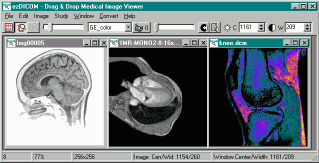
This software is designed to display most medical images: MRI, CT, X-ray, and ultrasound. All versions of ezDICOM can automatically detect the format of a medical image and display it on the screen. The ezDICOM project will appeal to several groups of people:
My DICOM page lists a large number of free DICOM viewers. So what are the benefits of ezDICOM? The main benefit is that the software is easy to use, mature (stable, few if any bugs) and can view a wide range of medical images including proprietary formats as well as images in the DICOM standard. For example, In addition, most free DICOM viewers only read a small subset of the DICOM images available, while ezDICOM can view a broad range of images. In addition to DICOM images, thesoftware will automatically recognize and display Analyze, GE (LX, Genesis), Interfile, Siemens (Magnetom, Somatom) and NEMA images. The greatest strength of ezDICOM is that it is free and open source. There are many variations of medical images 'in the wild' - many of these are poorly or incorrectly documented. By being free, ezDICOM has developed a wide user base, and this ensures the quality of the code. Thousands of people have used ezDICOM and sent in unusual and rare images, and the code is now mature and able to read virtually all the popular medical images. Therefore, the users are the most important strength of this software. It is important to acknowledge the many people who shared their images with the developers. The advantage of being open source is that programmers can modify and improve the code if they want. The project was started by Wolfgang Krug and has been expanded and maintained by Chris Rorden. Development was particularly aided by Earl F. Glynn's general programming tutorials and David Clunie's medical imaging FAQ. Special mention should also go to Jakob Scholbach (coauthored the lossless JPEG decoder), Armando Alaminos Bouza (Somatom formats), Yves Martel (various formats) and Sebastien Barre (useful suggestions). This software is covered by the BSD open source license. You can distribute both compiled projects and the source code. However, you should also distribute the license (the compiled standalone program makes this easy: the license is built into the 'about' window). The license also notes that the software is provided 'as is', use it at your own risk. This software attempts to reproduce medical images accurately. However, it is not designed for clinical use: computer monitors can vary tremendously in image quality. All grayscale images are rendered in 256-levels of gray (this is true of all of the viewers which I know of). |
| ezDICOM
for users Introduction. The standalone ezDICOM for windows program is a basic but useful tool for viewing medical images. This software will run on computers with Windows 95 or later and requires less than 300 Kb of disk space. To view an image, you simply drag and drop the image onto the program (or you can choose 'Open...' from the 'File' menu). Despite the ease of use, ezDICOM has a number of powerful features. For example, you can set the brightness and contrast of an image with great precision.You can also animate images that have multiple slices (e.g. see a heart beating over time or see different depths into the brain). Installation. To download the ezDICOM standalone application [version 1, release 24 ], shift+click here. The program is distributed as a compressed zip file - simply extract the files and double click on ezDICOM.exe. Delphi source code is also included. |
 Kaisi Yeh Yaariaan 61 High Quality -: Manik and Nandini face their differences head-on, attempting to find a middle ground as they navigate their complicated "Hamesha Forever" dynamic. Cast and Characters "Keep it. And when you're done running, read the ending again. Maybe you'll realize that the tragedy wasn't that they loved each other. The tragedy was that they didn't have enough time." The emotional anchor of Episode 61 centers around Dhruv (played by Utkarsh Gupta) attempting to finally voice his deep romantic feelings for Nandini Murthy ( Niti Taylor ). Episode 61 lands squarely in the "Golden Era" of Kaisi Yeh Yaariaan . By this point, the walls between Manik Malhotra—the dark, brooding leader of FAB5—and Nandini Murthy—the optimistic girl who refuses to break—are crumbling. This episode is a pivotal chapter in the "Manan" love story, highlighting the internal conflict Manik faces: his growing, undeniable feelings for Nandini versus his loyalty to his friends and his "bad boy" reputation. kaisi yeh yaariaan 61 But then he remembers Mukti’s lies. He turns his back. What stood out: Where to Watch Kaisi Yeh Yaariaan - Season 1 • Episode 61 - Boy Interrupted Online - Plex. : Manik and Nandini face their differences head-on, In the 61st episode of Kaisi Yeh Yaariaan ("Boy Interrupted"), tension peaks as Dhruv’s confession to Nandini is interrupted by Shahid, while Manik officially breaks up with Alya and navigates his growing feelings for Nandini amidst loyalty to his friend. This critical episode highlights the central conflict between personal desires and Fab 5 friendship dynamics, serving as a turning point in the series. For the full episode, visit The friends continued to face new challenges and excitement, but with Aryan by Naina's side, they felt more confident and ready to take on whatever life threw their way. Officially titled the episode aired on November 3, 2014 . It is the 61st episode of the show's first season, which initially premiered on MTV India on July 21, 2014, before the series found a new home and multiple seasons on digital platforms like Voot and JioCinema. Lasting around 22 to 24 minutes, this episode was a perfect encapsulation of the drama, romance, and emotional turmoil that fans had come to expect from the show. The episode is situated within a larger narrative arc where friendships were being tested, rivalries were intensifying, and the core romantic relationship was navigating a minefield of misunderstandings. Prior episodes had seen Nandini and Manik getting closer, only for external forces to pull them apart, setting the stage for the fateful party that takes center stage in "Boy Interrupted". Maybe you'll realize that the tragedy wasn't that Manik explicitly tells Nandini that he and Alya have officially parted ways . This comes hot on the heels of Manik discovering that Alya was harboring dangerous insecurities that led to toxic behavior. Precedes the explosive, groundbreaking LGBTQ+ storyline of Season 1. Why Episode 61 Matters to the "MaNan" Legacy Full Episode | Ep 61 | Kaisi Yeh Yaariaan This public link is valid for 7 days and shares a thread, including any personal information you added. This link or copies made by others cannot be deleted. If you share with third parties, their policies apply. Can’t copy the link right now. Try again later. Kaisi Yeh Yaariaan - S1 • E61 - Boy Interrupted - Plex | Character | Before Episode 61 | After Episode 61 | | :--- | :--- | :--- | | | Arrogant, passionate, but emotionally available. | Closed off, paranoid, self-destructive. Starts smoking. | | Nandini | Soft, forgiving, a follower. | Fierce, independent, a leader. Drops photography for music. | | Mukti | The secret villain. | Her lies are exposed to the audience, but not to Manik yet. | | Cabir (Ayaz Ahmed) | The comic relief. | Becomes the moral compass, trying to reunite the band. | "I am not scared!" she snapped, her eyes flashing with sudden fire. "I am trying to do the right thing! You don't understand. You have the Fab 5. You have everything. I am just... I am just Nandini Murthy." |
| DCM2JPG console
application DCM2JPG is a simple command-line Windows program. If you drop a file on the program it will create a JPEG version of the file (alternatively, if you name the program 'dcm2png.exe' or 'dcm2bmp.exe' it will create PNG or BMP format images). You can also call the program from the command line, to do special functions like change the image brightness or contrast (most grayscale DICOM images have much higher precision than can be saved to standard bitmap formats). Another nice feature is the ability to create nice zoomed versions of DICOM images - e.g. save a 128x128 pixel image as a 192x192 pixel bitmap (scaling is done using a bilinear-interpolation method to reduce any jaggy edges). Both a compiled program and the (ezDICOM-based) source code can be downloaded by shift+clicking here. Here is a short overview of the commands: OPTIONS
EXAMPLE:
TRICKS:
|
| ezDICOM for
programmers The basic concept is that code for ezDICOM can be included in more complicated projects. A good example is Chris Rorden's MRIcro freeware. MRIcro includes a lot of powerful features that are useful for scientists studying the brain. The casual user will find MRIcro much more difficult to use than the basic ezDICOM, but specialist will appreciate MRIcro's additional features. There are actually three versions of ezDICOM available for programmers, depending on the computer language you use. In all cases, the source code is provided, so you can either use the software as a modular unit without needing to learn about any of the details of medical imaging, or you can modify how these components work.
|
 |